

VibeTester Overview
What is VibeTester?
Section titled “What is VibeTester?”VibeTester – AI Test Case Generator for Jira helps teams automatically create high-quality test cases directly from Jira issues using AI.
It integrates seamlessly with test management tools (such as Xray and Zephyr) and AI Large Language Models (LLMs) (such as OpenAI, Azure and Anthropic) to speed up test design and improve consistency.
With just a few clicks, you can transform Jira issue details into executable test cases in either standard action/data/expected or BDD / Cucumber format.
You can also provide additional context to guide AI in generating more accurate scenarios.
Key Features
Section titled “Key Features”-
✅ Automatic test case generation from Jira issue fields
-
✅ Supports Cucumber BDD and standard test case formats
-
✅ Customizable inputs – select which Jira fields (Description, Acceptance Criteria, etc.) to use
-
✅ Add extra context or supporting files to improve accuracy
-
✅ Review and edit scenarios before saving
-
✅ Seamless integration with leading test management systems including Xray or Jira
-
✅ Native Jira Cloud experience – no external tools needed
How It Works
Section titled “How It Works”The plugin is built around three main components:
1. App Settings
Section titled “1. App Settings”Administrators configure system-wide integrations:
-
Connect to an AI provider (e.g., OpenAI, Azure, Anthropic)
-
Link to your test management system (e.g., Xray, Zephyr)
2. Project Settings
Section titled “2. Project Settings”Project leads can configure how VibeTester works at the project level:
-
Enable or disable the plugin for the project
-
Select your test management integration (e.g., Xray, Zephyr)
-
Choose Jira issue fields (such as Description or Acceptance Criteria) to provide context for AI
-
Set Test Case Generation Rules to define how test cases should be structured and written, ensuring consistency across the entire project team
3. Issue Page
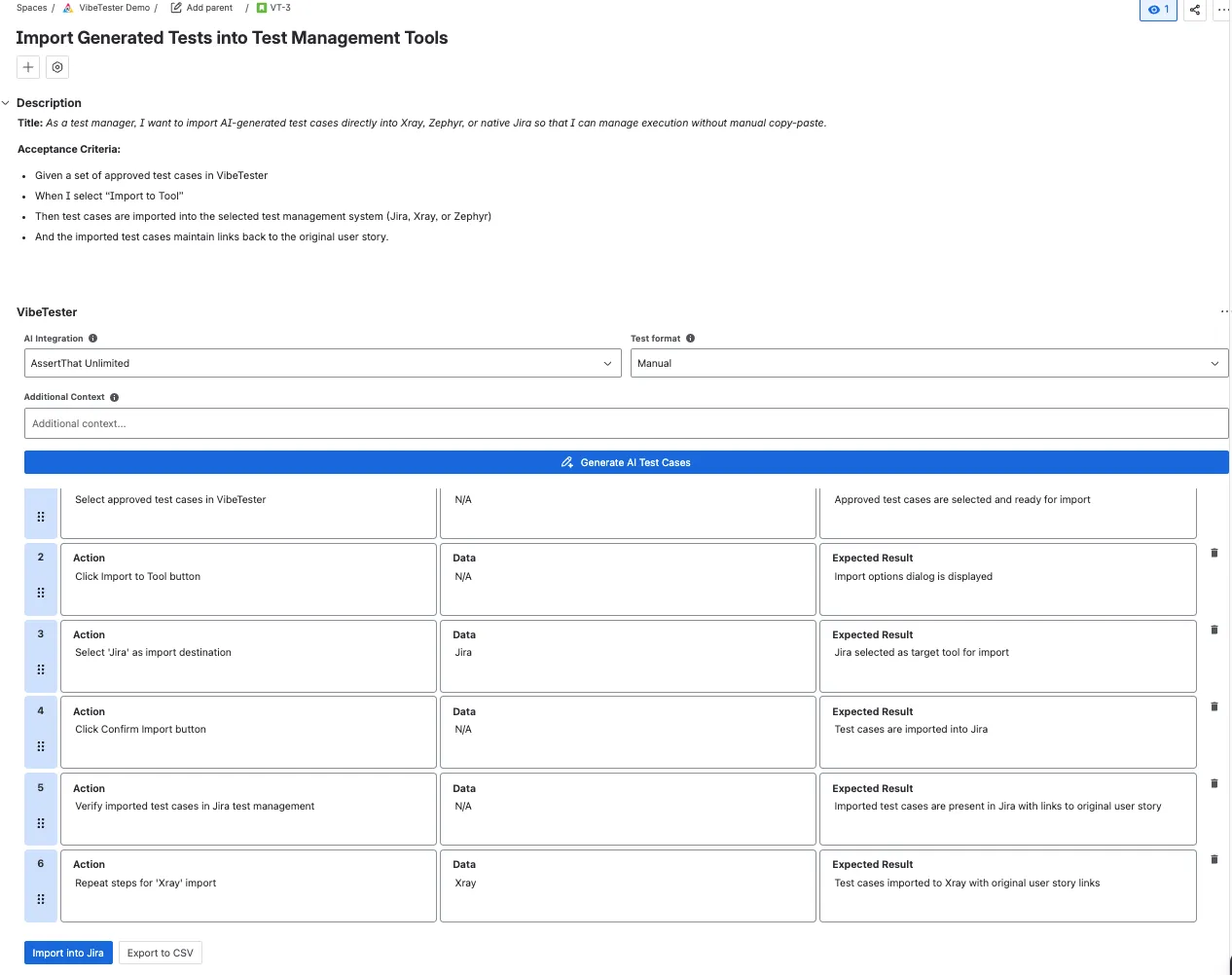
Section titled “3. Issue Page”On the Jira issue page, users can generate and manage test cases with VibeTester:
-
Select the AI model you want to use
-
Choose the Test Case Rules defined in Project Settings
-
Pick your Test Format: Manual, Generic, or Cucumber (BDD)
-
(Optional) Add additional context to guide the AI
-
Click Generate AI Test Cases
Once generated, you can:
-
✏️ Edit steps directly
-
➕ Add new steps or create additional test cases
-
🗑 Remove steps or cases that aren’t needed
-
📥 Import test cases into your chosen test management tool (e.g., Xray, Zephyr) or directly into Jira
-
📤 Export test cases to CSV for external use
Who Should Use VibeTester?
Section titled “Who Should Use VibeTester?”-
QA Engineers – to speed up test case creation
-
Product Owners – to ensure acceptance criteria are translated into testable scenarios
-
Developers – to quickly validate requirements in BDD format
-
Project Managers – to maintain consistent test coverage across projects
Next Steps
Section titled “Next Steps”-
👉 Start with the https://assertthat.atlassian.net/wiki/spaces/VIBE/pages/2849538442
-
👉 Learn how to configure App Settings
-
👉 Set up Project Settings
-
👉 See how to Generate Test Cases from Jira Issues