

Use advanced search with Cucumber tag expressions in Features
The advanced search allows you to build structured queries using the Cucumber tag expressions to search for features/scenarios.
Search for features using tag expressions
Section titled “Search for features using tag expressions”-
From your project’s sidebar, select Features.
-
Enter your tag expression query. As you type, the plugin will offer a list of “autocomplete” suggestions based on existing tags.
-
Your search results will be displayed in the features navigator.
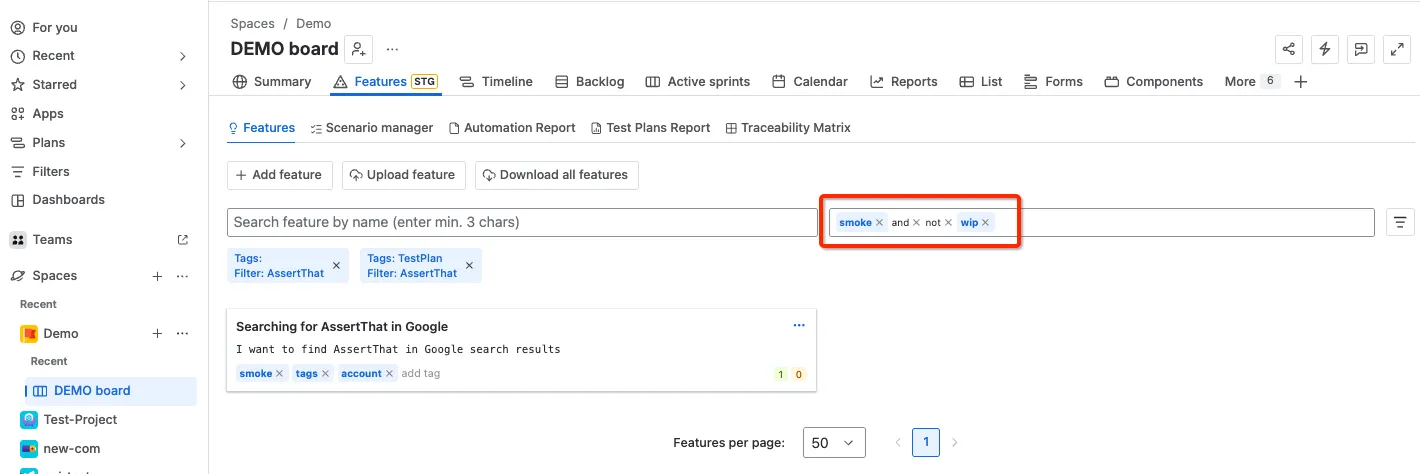
Understanding searching
Section titled “Understanding searching”Read the following article to learn how tags can be used:
https://cucumber.io/docs/cucumber/api/#tags
Constructing tag expressions
Section titled “Constructing tag expressions”By default the list of tags without any logical operators is considered as an AND expression. For example

this expression will find only features which have @smoke and @wip and @slow tags.
A more complex expression might look like this:

This expression will find all features that have @smoke and @wip tags but not @slow tag
Setting the precedence of operators
Section titled “Setting the precedence of operators”You can use parentheses in complex expression statements to enforce the precedence of operators.
For example, if you want to find all features tagged with @smoke and @wip, as well as all features with @slow tag

Note that if you do not use parentheses, the expression will be evaluated left-to-right.
You can also use parentheses to group clauses, so that you can apply the NOT operator to the group.
for example

Restricted words and characters
Section titled “Restricted words and characters”Reserved characters
Section titled “Reserved characters”Tag expressions have a list of reserved characters which can not be used as tags on their own:
“(“, “)”
Reserved words
Section titled “Reserved words”Tag expressions have a list of reserved words which can not be used as tags on their own:
“and“, “or“, “not“