

CI result import
Every CI system can send its test report to AssertThat with a single HTTP request. Each import matches the results to test cases (creating cases for new tests), and records them in an execution marked AUTOMATION, right next to your manual runs.
Supported formats: JUnit XML, Cucumber JSON, Playwright JSON, TestNG XML, NUnit 3 XML and Robot Framework output.xml.
Set up
Section titled “Set up”A Jira administrator does this once:
- Open Jira settings › Apps › AssertThat ATM and scroll to Automation / CI import.
- Copy the Import URL.
- Click Create API key and give it a name, such as GitHub Actions – web app. Create one key per pipeline so you can revoke each on its own.
- Copy the key. It is shown only once. Store it as a secret in your CI, for example
ASSERTTHAT_API_KEY, and the URL asASSERTTHAT_IMPORT_URL.
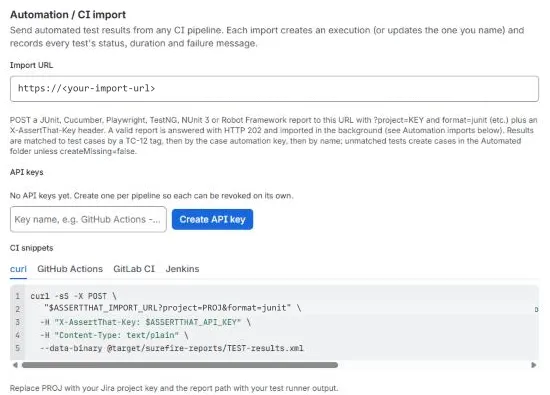
The CI snippets on the same page give ready-to-paste examples.
Send results
Section titled “Send results”POST <Import URL>?project=KEY&format=junitX-AssertThat-Key: <API key>Content-Type: text/plain
<report file as the request body>| Parameter | Required | Description |
|---|---|---|
project |
Yes | Jira project key, for example PROJ |
format |
Yes | junit, cucumber, playwright, testng, nunit or robot |
execution |
No | Record into this existing execution: TE-12 or its exact name |
executionName |
No | Name of the new execution. Default: Automation <format> #<build> <timestamp> |
environment |
No | Environment stored on the new execution |
build |
No | Build stored on the new execution and in each run comment |
createMissing |
No | true (default) creates test cases for unmatched tests; false only counts them |
folder |
No | Folder for new test cases and for name matching, A/B or A > B. Default: Automated |
A report can be up to 5 MB and 5000 results. Split larger suites into several imports into the same execution with execution=TE-n.
GitHub Actions
Section titled “GitHub Actions”- name: Send test results to AssertThat if: always() run: | curl -sS --fail-with-body -X POST \ "$ASSERTTHAT_IMPORT_URL?project=PROJ&format=junit&build=$GITHUB_RUN_NUMBER&environment=staging" \ -H "X-AssertThat-Key: $ASSERTTHAT_API_KEY" \ -H "Content-Type: text/plain" \ --data-binary @target/surefire-reports/TEST-results.xml env: ASSERTTHAT_IMPORT_URL: ${{ secrets.ASSERTTHAT_IMPORT_URL }} ASSERTTHAT_API_KEY: ${{ secrets.ASSERTTHAT_API_KEY }}GitLab CI
Section titled “GitLab CI”assertthat-import: stage: .post when: always image: curlimages/curl:latest script: - > curl -sS --fail-with-body -X POST "$ASSERTTHAT_IMPORT_URL?project=PROJ&format=junit&build=$CI_PIPELINE_ID&environment=$CI_ENVIRONMENT_NAME" -H "X-AssertThat-Key: $ASSERTTHAT_API_KEY" -H "Content-Type: text/plain" --data-binary @report.xmlDefine ASSERTTHAT_IMPORT_URL and ASSERTTHAT_API_KEY as masked CI/CD variables.
Jenkins
Section titled “Jenkins”post { always { withCredentials([ string(credentialsId: 'assertthat-import-url', variable: 'ASSERTTHAT_IMPORT_URL'), string(credentialsId: 'assertthat-api-key', variable: 'ASSERTTHAT_API_KEY') ]) { sh ''' curl -sS --fail-with-body -X POST \ "$ASSERTTHAT_IMPORT_URL?project=PROJ&format=junit&build=$BUILD_NUMBER" \ -H "X-AssertThat-Key: $ASSERTTHAT_API_KEY" \ -H "Content-Type: text/plain" \ --data-binary @target/surefire-reports/TEST-results.xml ''' } }}curl -sS -X POST \ "$ASSERTTHAT_IMPORT_URL?project=PROJ&format=cucumber&executionName=Nightly%20BDD&folder=BDD%2FCheckout" \ -H "X-AssertThat-Key: $ASSERTTHAT_API_KEY" \ -H "Content-Type: text/plain" \ --data-binary @cucumber-report.jsonHow results are matched
Section titled “How results are matched”Each test in the report is matched to a test case in this order:
- An explicit reference on the test: an
@TC-12tag,[TC-12]in the test name, or atestcaseproperty or annotation. - The automation key stored on a test case (set it in the test case editor).
- Cucumber only: a BDD test case with the same scenario and feature name, anywhere in the project.
- The same name in the target folder.
A case matched by a reference, scenario or name learns the test’s automation key, so later imports match it directly. Unmatched tests create new test cases in the target folder, unless createMissing=false. Cucumber scenarios become BDD test cases with the full Gherkin, and the rows of a Scenario Outline fold back into one Scenario Outline case with an iteration per Examples row.
| Format | Automation key | References | Status mapping |
|---|---|---|---|
| JUnit | classname.name |
[TC-n] in name, <property name="testcase" value="TC-n"/> |
failure/error → Failed, skipped → Skipped |
| Cucumber | feature uri:scenario name |
@TC-n scenario or feature tag |
failed → Failed; undefined, pending, ambiguous → Blocked; all skipped → Skipped |
| Playwright | file > describe > title [project] |
@TC-n tag, testcase annotation, title |
last retry wins; flaky → Passed; timed out → Failed; interrupted → Blocked |
| TestNG | class.method |
[TC-n] in description or name |
PASS, FAIL, SKIP; configuration methods ignored |
| NUnit 3 | test-case fullname |
TestCase or Category property, name |
Passed, Failed, Skipped; Inconclusive → Blocked |
| Robot Framework | Suite.Sub suite.Test name |
TC-n tag, name, documentation |
PASS, FAIL, SKIP; NOT RUN → Skipped |
When several tests map to one case (outlines, Playwright projects, parameterised tests), the worst status wins and durations are added up.
Responses and checking the result
Section titled “Responses and checking the result”The import is checked straight away and then runs in the background, usually within seconds. The response is one of:
| HTTP | code |
Meaning |
|---|---|---|
| 202 | accepted |
Valid key, project, format and report. The import is queued |
| 400 | bad-request |
Missing or invalid project or format, empty body, or a report that can’t be read or has no results |
| 401 | unauthorized |
Missing or invalid X-AssertThat-Key |
| 404 | not-found |
Unknown project, or the named execution doesn’t exist |
| 405 | method-not-allowed |
Not a POST |
| 413 | too-large |
Body over 5 MB |
| 500 | error |
Anything else; try again later |
Because the app runs on Atlassian, responses never contain app data such as counts or execution IDs. To see what happened:
- open the Execution tab: the new execution is there, marked AUTOMATION, with every result;
- or check Automation imports on the admin page: one row per report with its status (Queued, Running, Succeeded, Failed), the execution and a summary of results recorded, cases created and tests unmatched. Rows are kept for 30 days.
Good to know
Section titled “Good to know”- Keys are site-wide and can write to any project. Revoke a leaked key on the admin page; pipelines using it get
401immediately. - Imports run as the app, so imported runs have no executed by user.
- Requests are logged with the key, project and format only, never the report content or the key.
- Imports into the same execution can run in parallel. If you split one suite into parts, make sure they contain different tests.