

Audit log and archive
Audit log
Section titled “Audit log”Every change in AssertThat is recorded: who made it, when, what changed and where it came from. Open it with the Audit log button on the right of the project page’s tab row.
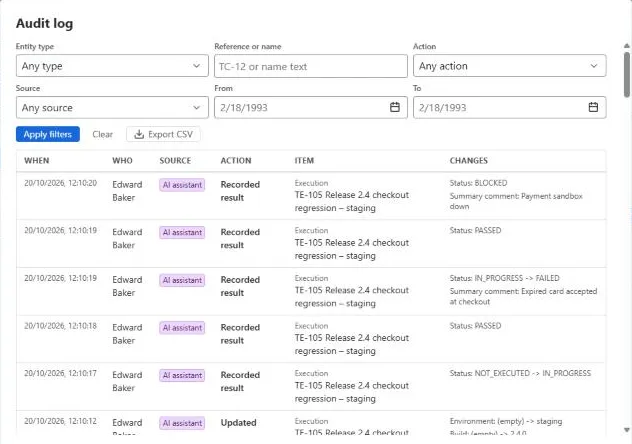
Filter by:
- Entity type, such as test case, test plan or execution;
- Reference or name, for example TC-12;
- Action, such as rename or archive;
- Source: UI, AI assistant, Rovo (the Rovo agent and MCP), API (personal API keys) or Automation (CI imports);
- a From and To date.
Each entry shows when, who, the item and the changes. People with the Manage settings and delete permission can Export CSV for compliance reviews.
Jira administrators set how long entries are kept under Global settings. The default is two years.
Item history
Section titled “Item history”Test cases, test plans and executions each have a History section listing their changes, newest first, with who made them. Click Load more to go further back. Ask the AI assistant What changed in TC-12 this week? for a summary.
Archive
Section titled “Archive”Deleting a test case, plan, execution or analytics file doesn’t destroy it: it moves to Archived. Each explorer has an Archived button.
In the archive you can:
- search and select items, then Restore selected to put them back where they were;
- Delete permanently, if you have the Manage settings and delete permission. Type DELETE to confirm. The app checks what else would be affected before it deletes.
Archived test cases don’t appear in the explorer, plans or new executions, but their past execution results are kept.